Township
- 4.7
- Rating
- 500.00M
- Installs
- Free
- Price
 Analysis by App-foxy
I approached Township expecting a light farming game, but it quickly showed me that its appeal comes from combining several gentle routines. I grow crops, process materials, expand a town, and solve match-3 puzzles, with each activity feeding into the next. That mixture makes it easy to play for a few minutes while still giving me a reason to return later.
Developed by Playrix, this free casual game is aimed at Everyone and has become a very familiar choice for players who enjoy colorful building games without complicated controls. Its average rating is 4.8 from around 12 million ratings, and it has passed 100 million installs. Those figures do not automatically make a game right for everyone, but they match my impression that Township is approachable, polished, and designed for a broad family audience.
What to expect when you begin
The opening experience is deliberately friendly. I was not asked to understand a large rulebook before playing. Instead, the game introduced farming and town tasks through short guided steps, letting me learn by doing. The early rhythm is simple: plant something, wait for it to grow, collect it, and use the result to support another activity.
You May Also Like

 AccuWeather: Weather Radar
AccuWeather Review: A Quick, Clear Forecast for Everyday Decisions
For everyday plans, the best forecast is the one you can understand quickly. AccuWeather makes rain timing, radar, and local conditions easy to act on, with a few trade-offs.

 Hill Climb Racing
Why Hill Climb Racing Still Turns Crashes Into One More Run
A tiny car, a bumpy hill and one more upgrade: Hill Climb Racing keeps resurfacing because its simple chaos makes every near-miss feel personal.

 AliExpress - Shopping App
AliExpress Makes Global Shopping Feel Personal, but Shoppers Bear the Risk
AliExpress turns a global marketplace into a pocket-sized discovery engine. Its reach is useful, its shopping loop compelling, and its trade-offs easy to miss.

 Lords Mobile: Kingdom Wars
Lords Mobile Is a Kingdom-Building Routine, Not a Quick Match
A case-by-case verdict on the building, battles, device demands, and social commitments that make Lords Mobile rewarding for some players and exhausting for others.

 PDF Scanner app - TapScanner
TapScanner Makes Paperwork Easier to Capture, Check, and Share
TapScanner makes scanning with a phone feel less like a rescue operation and more like a dependable step in getting work done. Its capture tools are useful, though not flawless.

 Block Blast!
Block Blast! Shows How Much a Puzzle Game Can Leave Out
A quiet grid game shows why puzzle players increasingly value instant clarity, repeatable skill and low-pressure play—and where the genre still needs to catch up.
More From Our News Desk
View All News


The town itself gives the game a stronger sense of progress than a standalone match-3 title. A puzzle can feel satisfying for a moment, but here the reward usually connects to a wider goal. I could look at the settlement and see why I was completing tasks rather than simply clearing another board. That connection is one of the most important reasons the game held my attention.
At the same time, this is not a fast action game. The pleasure comes from arranging a growing collection of small responsibilities. Crops, buildings, orders, and puzzle levels create a loop that rewards patience. If you want immediate competition or constant movement, the experience may feel slow. If you like checking a project, making a choice, and returning when something is ready, the pace is much more comfortable.
The game is free to download, although it includes optional in-app purchases ranging from $0.99 to $149.99 per item. I would treat those purchases as a convenience rather than a requirement for understanding the game. The more useful question is whether you enjoy the underlying waiting and planning. Spending money may reduce friction, but it does not change the fact that Township is built around gradual progress.
How the three main activities fit together
Farming is the clearest starting point. Planting crops is easy, but the better habit is to think one step ahead. Rather than filling every available space with the same crop, I found it more useful to consider what I was likely to need next. Keeping a small reserve can prevent a later task from becoming an unnecessary interruption.
Town building gives those resources a purpose. Expanding a settlement is not just decoration; it makes the world feel more personal and gives me visible evidence that earlier work mattered. I recommend resisting the urge to spend every available resource immediately. A little patience makes it easier to respond when the game presents a more useful construction or production goal.
The match-3 levels provide the most direct interaction. They break up the slower management sections and offer a compact challenge when I want to play actively. The important trade-off is that the puzzle mode does not replace the town simulation. Someone looking only for a deep match-3 game may find the surrounding systems distracting, while someone who enjoys both genres gets a more varied experience.
Setting up a comfortable first session
Township runs on Android devices using at least version 5.0 of the operating system. The current version is 32.1.0, so I would start by making sure the device is reasonably up to date before judging the experience. I also suggest beginning with a few uninterrupted minutes rather than opening it while rushing between tasks; the early tutorial is easier to follow when I can pay attention to what each resource is for.
The first useful decision is not about appearance. It is about learning the relationship between available space and future needs. Early on, the town can look empty, which may tempt a new player to place things wherever there is room. I found it better to pause briefly and notice which areas the game is actively guiding me toward. A tidy layout is not essential at the beginning, but leaving room for later changes saves some rearranging.
Notifications and return visits are part of the intended rhythm, but I would not let them dictate the entire day. My preferred approach is to open the game when I already have a natural break, collect completed work, start the next sensible task, and leave. This makes the simulation feel relaxing instead of turning it into another obligation.
New players may also wonder whether the game is suitable for children because it carries an Everyone content rating. The controls and presentation are accessible, and the basic activities are easy to understand. Still, purchases are present, so I would use the device’s normal purchase safeguards if a child will play independently. That is less about the farming mechanics and more about keeping the free-to-start model comfortable for the household.
The first meaningful success
For me, the first real success was not simply completing the tutorial. It was completing a small chain without wasting the available resources: growing what was needed, collecting it at the right moment, and using it to move the town forward. That moment showed me how the game wants to be played. The best progress comes from linking actions, not from tapping through every option as quickly as possible.
A practical beginner routine is to check unfinished crops first, then look at the current task or order, and only after that decide what to produce. This order prevents a common mistake: starting something attractive but irrelevant while a more useful item is already within reach. It also gives the session a clear endpoint. Once the next crop or product is underway, I can close the game without feeling that I missed an important decision.
The match-3 levels deserve a similar approach. I try to scan the board before making the first move instead of immediately matching the most obvious pieces. Creating a larger combination can be more valuable than clearing a single small group, especially when the board contains several possible directions. I would not call this advanced strategy, but it makes the puzzle section feel more deliberate and reduces the frustration of careless opening moves.
Another useful habit is separating progress from perfection. A level or town task does not need to be handled in the most elegant way every time. Township works better when I accept small inefficiencies and keep the wider cycle moving. Trying to optimize every crop, building placement, and puzzle move can turn a casual game into a spreadsheet, which defeats much of its charm.
Confusing moments and the friction behind them
The largest adjustment is understanding that Township has two speeds. The puzzle boards ask for immediate attention, while farming and town development often encourage waiting. Switching between those moods can be slightly awkward during the first session. I initially wanted every action to produce an instant result, but the game becomes more enjoyable once I treat waiting as part of the design rather than a problem to eliminate.
Resource management can also feel unclear at first. A new player may see several possible uses for the same materials and assume that spending them now is always helpful. In practice, holding back a little gives more flexibility. I recommend keeping enough basic resources to respond to the next visible request instead of investing everything in the first appealing improvement.
The town’s visual growth can create another kind of confusion. Because there are many attractive things to work toward, it is easy to mistake decoration for priority. I found it helpful to follow the active objectives until I understood the economy, then make personal choices about appearance. This keeps the early game moving while still leaving room for creativity later.
The purchase model is worth considering before committing to long sessions. The game is free, but the listed purchase range extends from small optional items to substantially more expensive individual purchases. I would recommend deciding in advance whether I am willing to spend anything, and if so, setting a personal limit. That simple boundary keeps convenience purchases from becoming an automatic response whenever progress slows.
Another limitation is that the combination of systems may not suit players who prefer a single focused genre. If I want only a pure farming simulator, the match-3 levels may feel like a detour. If I want only quick puzzle rounds, the crop and town routines may seem like chores between boards. Compared with a basic match-3 alternative, Township offers more long-term context but less immediate concentration. Compared with a dedicated farming game, it offers more variety but less single-minded depth.
Who will enjoy it most
I think Township is especially good for someone who likes low-pressure progress and enjoys seeing several small decisions build into a larger place. It works well for short breaks, because one can collect a result or attempt a puzzle without needing to complete a long story chapter. It also suits players who enjoy returning to an evolving project rather than finishing everything in one sitting.
A realistic everyday example would be a morning commute or a quiet coffee break. I might open the game, collect crops that finished earlier, start another useful production step, and play a match-3 level while waiting. In the evening, I can check what has completed and use those materials to advance the town. The important point is that the same session can be either two minutes or considerably longer, depending on whether I want management or puzzles.
Families may appreciate the approachable presentation, but I would still explain the purchase system to younger players. Adults who dislike timers, repeated resource collection, or optional spending should approach it cautiously. The game is not a good choice if I am looking for a fully offline-feeling experience with no return prompts or a tightly finished campaign.
Players who enjoy optimizing systems can find more depth than the bright artwork suggests, especially when planning crops around upcoming needs. However, I would not choose it as a competitive strategy game. Its satisfaction comes from personal development and routine decisions, not from proving that I can outplay another person in a demanding contest.
What to do after the first session
Once the basic loop makes sense, I would stop trying to unlock everything at once. Choose one practical goal, such as improving the flow of materials or making room for the next town step, and let the other possibilities wait. This keeps the game readable and makes each return visit feel purposeful.
It is also worth developing a simple inventory habit. Before beginning a puzzle or spending a resource, I look at what is already available and what the current task is asking for. That short check is more valuable than constant tapping. It reduces accidental waste and makes the town feel like a place I am managing rather than a menu I am clearing.
For puzzle levels, I would play when I am alert enough to think about the board. If I am tired, the farming side is a better fit because it allows slower decisions. This is one of Township’s quiet strengths: the game can match different moods, provided I do not force every mode to deliver the same kind of excitement.
The developer’s long-running presence is reflected in the amount of content and the mature structure of the game, but that also means a first-time player may see more possibilities than expected. I would give myself time to learn the core cycle before forming an opinion about every system. The first few minutes explain the direction; the real appeal appears when the town begins to feel like a personal project.
After spending time with it, my recommendation is straightforward: try it if you want a colorful casual game that blends farming, town development, and match-3 challenges into one ongoing routine. The best way to enjoy Township is to treat progress as a steady habit, not a race. I would skip it if I need instant rewards, a purely focused puzzle experience, or a game with no purchase pressure at all. For everyone else, it offers a welcoming starting point, a satisfying first milestone, and enough connected activities to remain interesting beyond the tutorial.
FAQs for Township
01What is Township and what can I do in the game?
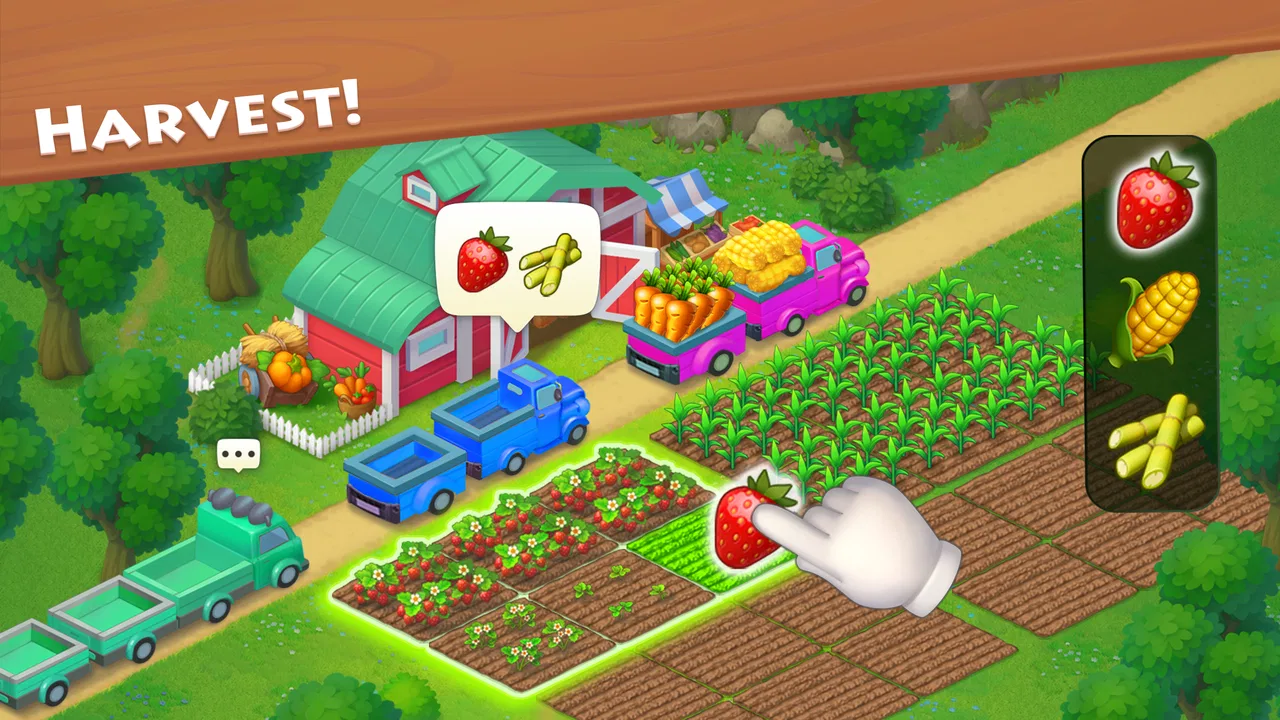
Township is a unique blend of city-building and farming that allows players to create their dream town. You can plant crops, harvest them at the farms, process them at your factories, and then sell goods to develop your town. Additionally, players can explore mines, collect resources, and manage various aspects of town life, ensuring a vibrant and thriving community.
02Is Township free to play, and are there in-app purchases?
Yes, Township is free to download and play on both Android and iOS devices. However, it does offer in-app purchases that can enhance the gaming experience. These purchases range from additional currency to exclusive items that can speed up construction times or provide other advantages in gameplay. It's important for players to manage these purchases to avoid unexpected expenses.
03Can I play Township offline, or do I need an internet connection?
Township requires a stable internet connection to play. This connectivity is essential for features such as social interactions, updates, and accessing various game events. While some basic gameplay might be available offline, to fully enjoy all aspects and functionalities of Township, an internet connection is recommended.
04How does Township handle social interactions with other players?
Township offers rich social features, allowing players to connect with friends and join co-ops. Through co-ops, players can trade goods, compete in regattas, and collaborate to achieve common goals. These social interactions enhance the gaming experience by fostering a community where players can share strategies and resources.
05What are some tips for beginners starting in Township?
For beginners, it's crucial to plan the layout of your town efficiently. Focus on balancing the production and storage of resources. Prioritize upgrading factories and planting a variety of crops. Joining a co-op early can provide valuable support and resources. Also, completing orders and tasks will help you earn coins and experience points quickly.
Pros
- Engaging blend of city-building and farming.
- Vibrant graphics with charming animations.
- Regular updates with new events and features.
- Social features to play with friends.
- Intuitive controls and user-friendly interface.
Cons
- Requires constant internet connection.
- In-app purchases can be pricey.
- Progress can be slow without spending.
- Some tasks are repetitive.
- Limited customization for buildings.

Township
Gallery